


 26/10/2026
 by Ahetesham
 Copy
Link
Copy
Link
- PHP2Shell: The Critical PHP Vulnerability That Could Put Your Server at Risk
PHP2Shell: The Critical PHP Vulnerability That Could Put Your Server at Risk
Hey there! 💙
Imagine your website is minding its own business, serving pages and handling customer requests. Then a flaw in the language powering it could let an unauthenticated attacker run code on the server.
Yeah. That's not the kind of plot twist anyone wants. 😬
In October 2026, the PHP security team disclosed two critical vulnerabilities collectively referred to as PHP2Shell: CVE-2026-109618 and CVE-2026-109619. Under certain conditions, these flaws could allow remote code execution without authentication.
Let's unpack what happened, why it matters even if you use WordPress or another PHP-based application, and what you should do next.
Important: This is a security explainer, not a substitute for your hosting provider's or operating-system vendor's advisory. Check the latest official guidance before changing production settings.
What Is PHP2Shell? 🔍
PHP is the server-side runtime behind many websites and applications, including WordPress, Drupal, Joomla, and applications built with frameworks such as Laravel.
PHP2Shell refers to two critical flaws in PHP's request handling. The bugs affect the runtime itself, rather than one particular WordPress plugin or theme. That means updating your CMS alone is not enough if the PHP runtime serving your website remains vulnerable.
The PHP team released security updates on 21 October 2026 for these two issues. The announced fixed releases were:
| PHP branch | Fixed release |
|---|---|
| PHP 8.5 | 8.5.12 |
| PHP 8.4 | 8.4.27 |
| PHP 8.3 | 8.3.36 |
| PHP 8.2 | 8.2.35 |
Use the appropriate fixed package for your branch, or the security-fixed package supplied by your operating-system or hosting vendor. PHP 8.1 and older branches are upstream end-of-life; ask your vendor whether it provides a maintained security backport or plan a supported upgrade.
These versions address the two original PHP2Shell CVEs. There is also a related issue, CVE-2026-115560, which the 21 October releases did not fix. We'll cover the additional guidance below.
How Do the Vulnerabilities Work? 🧠
You don't need to understand PHP's internal memory management to take the right action, but the broad idea is useful.
1. CVE-2026-109618: A failure while handling memory
This flaw involves an out-of-memory condition during request processing. If allocation fails at a particular point, PHP can be left with partially initialized internal request data. Cleanup may then handle that invalid state incorrectly.
In the right circumstances, that memory-handling bug could become a route to remote code execution.
2. CVE-2026-109619: Stale internal state
This flaw involves internal request state that can outlive the memory it refers to. A later operation may reuse a stale pointer before the relevant state has been properly reset.
PHP's security team and researchers describe request-handling and session-upload-progress behaviour as relevant to the vulnerability chain.
Successful exploitation depends on the runtime and its configuration. PHP identifies Apache deployments using mod_php as particularly concerning, but the advisory covers PHP installations serving web requests across multiple setups, including PHP-FPM, php-cgi, FrankenPHP, and LiteSpeed. Don't assume you're safe simply because you use a different web server.
A simplified view of the PHP2Shell attack path
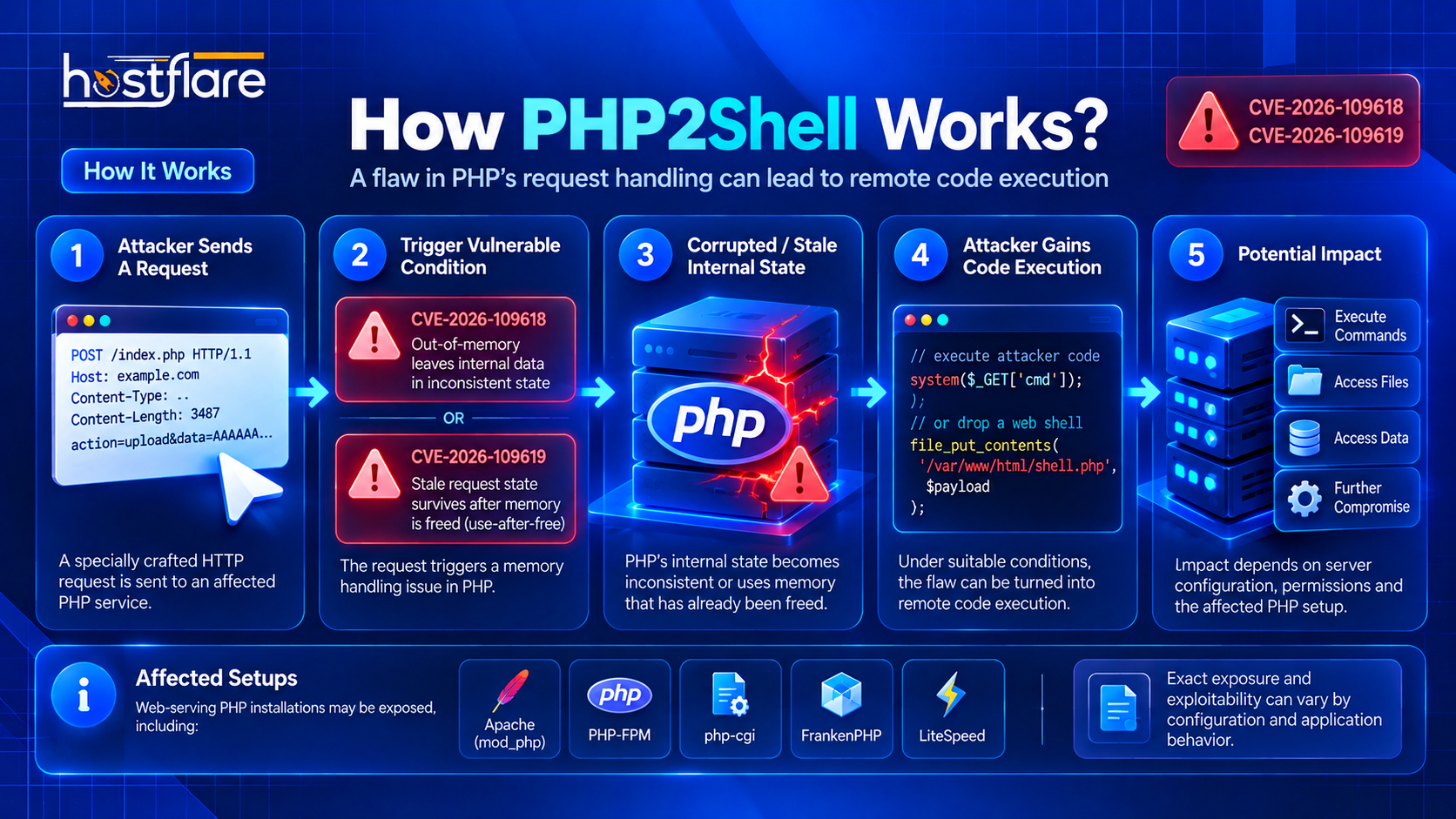
Illustration only: this diagram simplifies the vulnerability chain. It is not an exploit walkthrough or proof that every PHP configuration is equally exposed.
Why Should Website Owners Care? 🚨
If an attacker successfully exploits a server-level PHP flaw, the consequences can extend beyond a single page or plugin. Depending on the permissions and isolation of the affected service, an attacker could potentially access or modify files available to that process, interfere with applications, or attempt to reach other resources.
That doesn't mean every PHP website has been compromised. It means exposed, affected runtimes need prompt attention—and a website owner shouldn't rely on a CMS update or a security plugin to patch PHP itself.
A few things worth remembering:
- WordPress updates and PHP updates are different. You need to check both.
- A version shown by the command line may not be the web runtime. Hosting panels and PHP-FPM pools can use different versions.
- A firewall or WAF is not a replacement for a security update. It may add a layer of defence, but it doesn't fully remediate the original flaws.
- Unsupported PHP needs special care. Don't assume an old branch is fixed just because a package version looks different; confirm the vendor's security advisory.
What About CVE-2026-115560? ⚠️
On 23 October 2026, the PHP security team published additional information about a related issue, CVE-2026-115560, involving session upload progress.
The PHP team's guidance describes a relatively uncommon combination of configuration and application behaviour required for this attack path. The issue was not fixed by the 21 October releases listed above.
Until an update addressing it is available, the PHP team recommends disabling session upload progress:
session.upload_progress.enabled = 0
Treat this as an interim mitigation for the related issue, not as a substitute for updating PHP to address CVE-2026-109618 and CVE-2026-109619. Configuration changes can affect applications, so check your hosting provider's or vendor's latest instructions before applying them. Recheck the official PHP advisory for the current status of CVE-2026-115560 before acting.
Your PHP2Shell Security Checklist ✅
Here is a practical checklist for website owners and administrators.
1. Find the PHP runtime serving your website
Check the PHP version assigned to your actual website in your hosting control panel. If you manage the server yourself, verify the web-serving runtime and the PHP-FPM pool or other handler used by the site. A CLI version check alone may not tell the whole story.
2. Apply the appropriate security update
Upgrade to a fixed, supported PHP release or install the security-fixed package supplied by your vendor. If you're on an end-of-life branch, ask the vendor for explicit confirmation of the backport or plan a migration to a supported branch.
3. Follow the latest advice for CVE-2026-115560
Until the related issue is patched in your environment, review the official guidance about disabling session upload progress. If you're on shared hosting, ask your provider to confirm what has been applied at the server level.
4. Reload services and verify
Depending on your setup, a PHP update may require reloading or restarting the relevant service or worker pool. Follow your vendor's procedure, then verify that the website is actually using the updated runtime.
5. Check for signs of compromise
Review available web-server, PHP, and application logs for unusual requests or errors around the disclosure and patching period. Also investigate unexpected file changes, unfamiliar administrator accounts, suspicious processes, or unexplained outbound connections.
If you find credible signs of compromise, preserve relevant logs, contain the affected system, and follow your incident-response process. Patching closes a vulnerability; it does not prove that an earlier intrusion did not occur.
6. If you use shared hosting, contact your provider
You may not be able to update PHP or change server-wide settings yourself. Ask your host:
- Which PHP version and handler serve your domain?
- Has the relevant PHP2Shell security update been installed?
- What mitigation or vendor guidance is being applied for CVE-2026-115560?
- Do you need to change anything in your account or application?
A reliable provider should be able to explain the remediation status or direct you to its official advisory.
A visual checklist for remediation
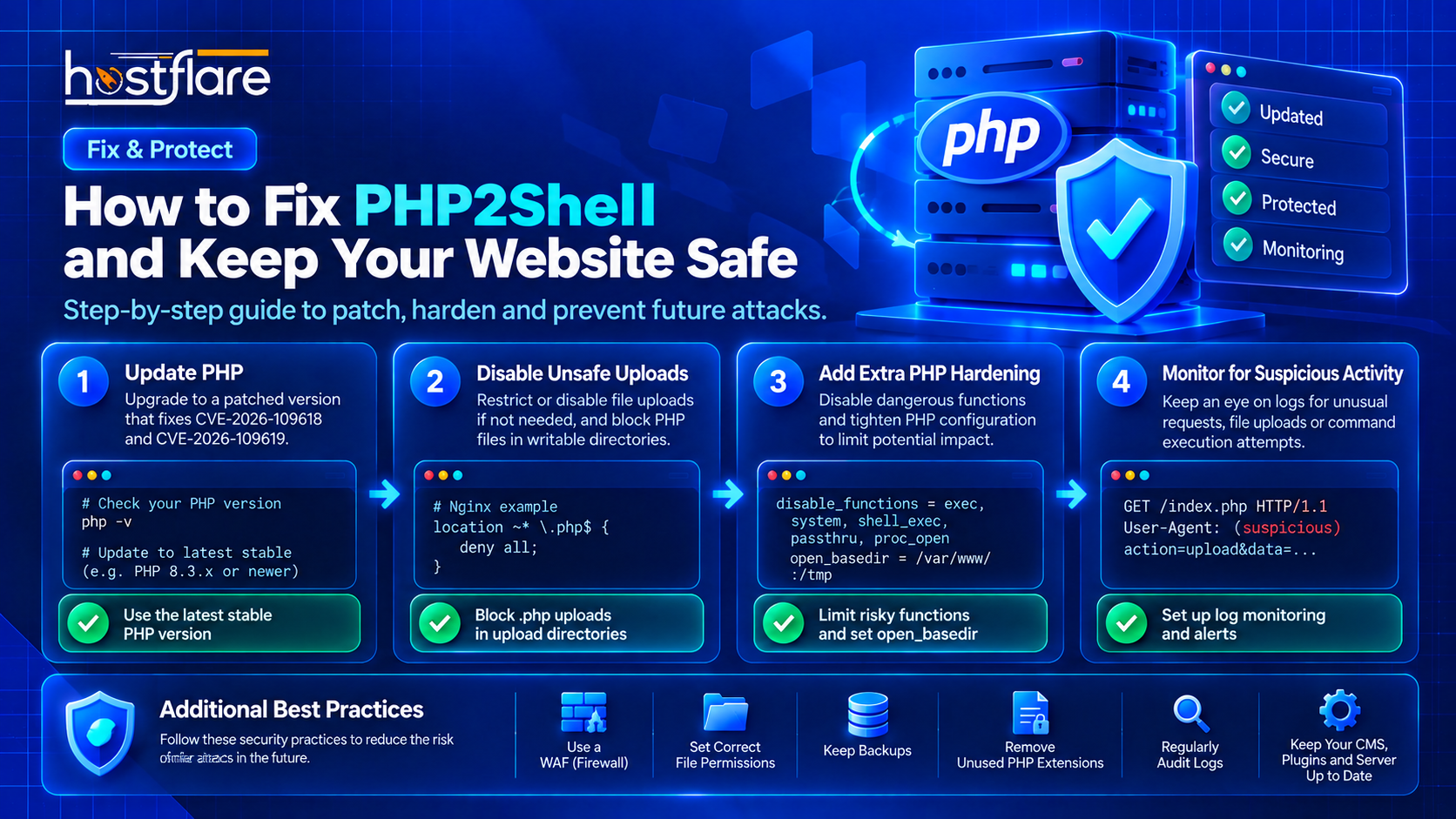
Important: Treat this graphic as a high-level visual only. Do not copy its example web-server or PHP configuration snippets as universal fixes. In particular, a rule that denies all PHP requests can break a site. Follow the current PHP and hosting-vendor advisories and test configuration changes for your environment.
Don't Rely on Random Configuration Snippets 🛠️
You may see advice online recommending changes to PHP functions, filesystem restrictions, web-server rules, or upload settings. Some hardening measures can be useful in the right environment, but they are not universal fixes for PHP2Shell.
For example, a web-server rule that blocks all PHP requests could take your website offline, while disabling functions or changing filesystem restrictions may break legitimate applications. Don't copy generic snippets into production without understanding their scope and testing them.
For the original PHP2Shell vulnerabilities, the PHP team's guidance is clear: install the appropriate security update. Use additional configuration changes only when they match current vendor guidance and your actual setup.
Official Sources and Further Reading 📚
- PHP security advisory and fixed releases
- Canadian Centre for Cyber Security advisory and update on CVE-2026-115560
- NCSC-NL operational tracking for PHP2Shell
- Red Hat's PHP2Shell advisory
Security advisories can change as vendors publish updates. Check the current versions and instructions from the PHP project and the vendor responsible for your PHP packages.
Final Thoughts 💙
PHP2Shell is a reminder that website security isn't just about plugins, passwords, and themes. The runtime underneath your application matters, too.
Identify the PHP version that actually serves your site, apply the appropriate vendor-supported security update, review the latest advice for the related CVE, and investigate anything suspicious. If your host manages PHP for you, ask them to confirm the status rather than guessing.
A few careful checks now can save you a much bigger headache later. Your website deserves that extra bit of love. 🔐
Stay updated. Stay secure. Happy Hosting! 💙